
Biblia con lenguaje actual
Bible FrançaisLibraries & Demo
4.843.00 Reviews
- Version
- Biblia con lenguaje actual 9.0
- Installs
- 50.00K
- Age Rating
- Everyone
Screenshots


Our Review of Biblia con lenguaje actual
 Analysis by Appyee
I reach for a Bible app when I want to read a passage without turning the moment into a technical project. Biblia con lenguaje actual is aimed at that straightforward need: it presents scripture in contemporary Spanish, which can make a first read feel less demanding than wording that sounds unfamiliar today. I find that emphasis useful for casual reading, family conversations, and anyone returning to a text after a long break. The key question is not whether modern language replaces every other translation, but whether it helps you get into the passage with less friction.
Reading comfortably and finding your way
The app is listed in the Libraries & Demo category, and its purpose is more focused than a general study library: it centers on the Bible itself. Bible Français is the developer. It is free to install, has an Everyone content rating, and offers in-app purchases priced at $0.99 per item. Its current version is Biblia con lenguaje actual 8.0, and Android support starts at version 6.0. The app was released on Oct 27, 2022; it has a 4.8 average from around 1.9K ratings, with 50K+ installs. Those figures suggest it has found an audience, though they cannot tell you whether its particular translation suits your reading habits.
First things first, downloading and setting up the app is a breeze. Whether you’re an Android or iOS user, you’re just a few taps away from having this app ready to go. Once installed, you’re greeted with a clean and uncluttered interface that’s designed to make navigation a piece of cake.
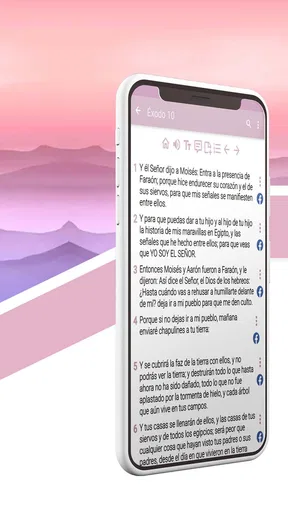
One of the first things I noticed is how accessible everything is. You don’t need to be a tech wizard to find your way around. The menu is intuitive, and the search function works like a charm, letting you jump straight to any book, chapter, or verse you’re curious about.
For a reader who already knows the reference, searching directly is the quickest route. If you only remember a phrase or the broad idea of a passage, take a moment to try different everyday words rather than assuming one exact wording will match. A contemporary translation can be approachable, but searching still works best when you know at least part of the wording or can narrow the passage by book. I would use the app’s navigation for a quick lookup, then read a little before and after the verse so the result is not detached from its context.
That small habit matters in practical use. If someone mentions a chapter during a conversation, I can go straight there; if I am preparing to discuss a theme, I would not treat one search result as the whole answer. Reading neighboring verses helps me follow who is speaking and what the passage is responding to. This is a useful distinction for newcomers in particular: easy language can reduce the effort of reading, but it does not remove the value of taking a passage in context.
Modern wording and personal study
What sets Biblia con lenguaje actual apart is its modern translation. It’s written in a way that’s closer to how we speak today, making it easier to digest and relate to. If you’ve ever struggled with the more traditional versions of the Bible, this app might just be the answer you’ve been looking for.
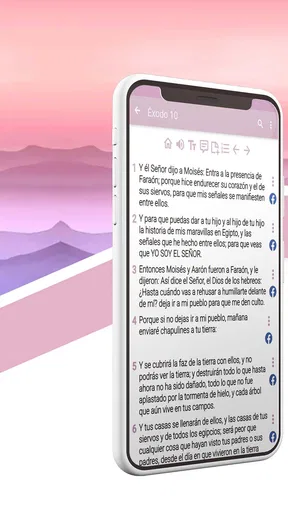
The app also includes some nifty features like bookmarking and highlighting. I found these super useful for keeping track of passages that resonate or that I want to revisit later. There’s even a note-taking feature, which is perfect for jotting down thoughts or reflections as you read.
These tools make most sense when used as a simple personal workflow rather than as decoration. I would bookmark a passage I want to return to, highlight only the line or phrase that carries the point for me, and keep a note that records why I saved it. That last step is easy to overlook: a highlight can feel meaningful in the moment, but a short note such as “read with the previous paragraph” or “ask about this at the study group” gives the saved passage a purpose later. If you prefer a clean page, using fewer marks also makes the passages you truly want to find stand out.
There is a trade-off between a readable translation and close comparison. Contemporary wording can be easier to follow on a first pass, but a reader studying a precise phrasing or comparing traditions may want a second translation alongside it. I would not expect one translation to settle every interpretive question. Instead, I see this app as a comfortable place to begin reading, with another Bible or a reference resource better suited when wording differences are the main subject.
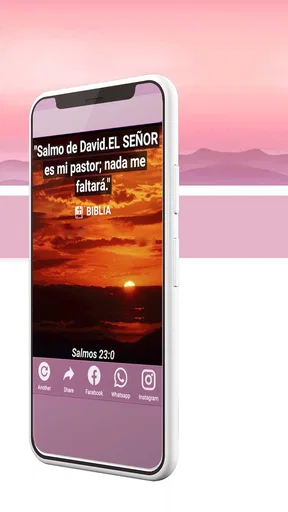
Another cool aspect is the daily verse feature. Every day, the app serves up a new verse to inspire and ponder over. It’s a small touch, but it adds a nice rhythm to your daily routine.
A daily verse works best for me as a prompt, not a substitute for a reading habit. For example, during a short break, I might read the verse, save it if it genuinely catches my attention, and return later to read the surrounding passage. That turns a quick glance into a more grounded moment without requiring a long study session. If reminders or a fixed schedule are important to you, check how the app fits your routine after installing it rather than assuming the daily feature will match your preferred timing.
Reading across different needs and settings
The design of the app is another big win. It’s aesthetically pleasing without being over the top. The text is clear and easy to read, with options to adjust the font size to suit your preference. This is great for those late-night reading sessions when you just want to unwind without straining your eyes.
Adjustable text size is a practical benefit for readers who need larger lettering, prefer less visual crowding, or simply read on a small phone. I would set the text to a comfortable size before beginning a longer session; repeatedly zooming or changing settings mid-passage can interrupt concentration. Still, a larger font can mean more scrolling, so there is a balance between reducing eye strain and keeping a full thought together on screen.
For sensory comfort, the straightforward layout described in the app’s design is a welcome starting point, but visual readability is only one part of access. Some people need strong contrast, a particular screen appearance, or spoken reading; others find prolonged phone reading tiring even when the text is clear. I would test a short passage in the lighting and screen settings I normally use before relying on it for a long session. If reading on-screen is not comfortable, a printed Bible or a reading tool with the specific display or audio controls you need may be a better fit.
Navigation is smooth, and I didn’t encounter any lag or glitches during my use. The developers have clearly put thought into ensuring a seamless experience, which is always appreciated.
Ease of navigation also matters for motor comfort. Reaching a known chapter through the menu or search is usually less work than browsing page by page, especially when I have only one hand free or want to make a quick lookup. At the same time, small touch targets and long stretches of scrolling can be difficult for some readers, and a simple interface does not automatically solve those issues. I would test the controls with the way I actually hold my phone and avoid relying on a rapid sequence of taps if hand movement is uncomfortable.
In an everyday situation, imagine having a few quiet minutes while waiting for an appointment. I would open a bookmarked passage, increase the type if the lighting is poor, and read a short section rather than trying to complete a long plan in a noisy place. If I wanted to share a thought with a family member afterward, I could use the sharing option described below. This kind of brief, flexible use is where a phone Bible can be more convenient than carrying a printed volume, while a paper copy may still be easier when I want to read for a long time without screen glare or notifications.
Sharing, plans, and choosing the right tool
For those who like to share their journey, the app makes it easy to connect with friends and family. You can share verses or notes via social media or messaging apps with just a few taps. It’s a fantastic way to spark conversations and share insights with others who might be on a similar path.
I would use sharing selectively: a verse sent with a brief personal note is more likely to start a real conversation than a bare excerpt. Before forwarding a passage, I would also check its surrounding context and make sure the translation’s wording is appropriate for the point I am trying to make. That extra pause helps prevent a line chosen for encouragement from being mistaken for a complete explanation of a difficult topic.
If you’re into more in-depth study, the app offers various reading plans and devotionals. These are great for guiding your study and ensuring you’re diving into different parts of the Bible regularly. It adds a layer of structure for those who prefer a more organized approach.
Plans and devotionals can help when the hardest part is deciding what to read next. I would choose one that fits the time I can genuinely give it, rather than starting an ambitious routine that quickly becomes a source of guilt. A plan is a guide, not a test: if I miss a day, I can resume when it makes sense. Readers who need scholarly references, detailed cross-references, or extensive comparison tools may be better served by a dedicated study Bible or a specialist app; this one’s appeal is its accessible reading experience and the personal tools described here.
For a beginner, the contemporary language and direct access to passages make this a reasonable place to start. For a regular reader, bookmarks, highlights, notes, and devotional structure can support a lightweight routine. It is less suited to someone who specifically wants a broad library of translations, advanced research aids, or a fully hands-free reading experience. I would also avoid treating its rating or popularity as proof that its wording will be the right fit for every denomination or study purpose; a sample passage is a better way to judge that.
One question many readers have is whether they can use it on an Apple phone, since the app’s description emphasizes Android. The app is presented as an Android offering, so I would check the relevant platform’s availability before planning around an iPhone or iPad. For Android users, the stated minimum is version 6.0, which gives a clear starting point for checking device compatibility. If a phone is shared with someone else, I would also keep personal notes in mind when deciding what to save or share.
A practical, inclusive verdict
All in all, the Biblia con lenguaje actual app is a solid choice for anyone looking to explore the Bible in a more relatable and accessible way. It combines modern language with a user-friendly design, making it a joy to use.
My view is positive, with a clear boundary: it is most convincing as an approachable reading companion, not as a replacement for every Bible format or research tool. The free installation lowers the barrier to trying it, while the listed in-app purchases mean I would check what is included before paying for anything. Since its age rating is Everyone, it may be considered for general audiences, but families should still decide what reading approach and discussion suit the people using it.
Whether you’re a seasoned reader or just starting your journey, this app has something for everyone. So, if you’re looking to enrich your spiritual life with something fresh and engaging, give this app a whirl. You might just find it becomes a staple in your daily routine.
For me, the inclusive verdict is that clarity and a calm, direct reading path matter more than a long list of tools. The app can help someone begin, return to a passage, or keep a personal reading rhythm, especially when modern Spanish is a welcome change from older-sounding wording. I would recommend trying a familiar passage and a new one, adjusting the text for comfort, and saving a note only when it will help later. If those basic tasks feel natural, it is a sensible companion; if your needs center on audio access, advanced comparison, or long screen-free sessions, a different format may serve you better.
Verdict
Strengths of Biblia con lenguaje actual
- User-friendly interface for easy navigation.
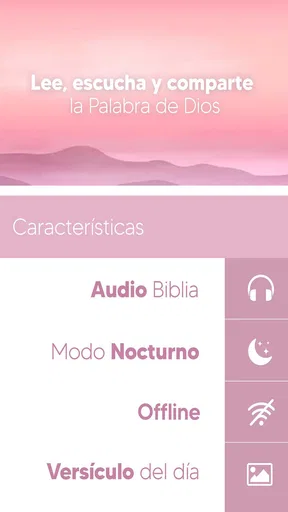
- Includes offline access for convenience.
- Regular updates enhance app features.
- Comprehensive search function for quick finds.
- Audio options for hands-free listening.
Limitations of Biblia con lenguaje actual
- Limited customization for text appearance.
- Ads can be intrusive for free users.
- Requires storage space for downloads.
- No night mode for reading in the dark.
- Social sharing options are limited.
Other Releases by Bible Français
View All
Bible King James Française
Libraries & Demo4.7
Similar Picks in This Category
View All
PGT: GFX, Launcher & Optimizer
Trilokia Inc.4.5

AusweisApp Bund
Governikus Service GmbH3.7

Cardboard
Google LLC3.2

Gamers GLTool with Game Tuner
Trilokia Inc.4.5

Multi Web Chat - Read Secretly
World Scan & Cleaner3.8

App Cloner Premium & Add-ons
App Listo1.9
Frequently Asked Questions
What is Biblia con lenguaje actual and how does it differ from other Bible apps?
Biblia con lenguaje actual is a Bible app designed to provide the scriptures in contemporary language, making them more accessible and understandable to modern readers. Unlike other Bible apps, it focuses on simplifying the text without losing the original meaning, which is ideal for those who may find traditional translations challenging to comprehend.
Is Biblia con lenguaje actual available for both Android and iOS devices?
Yes, Biblia con lenguaje actual is available for both Android and iOS platforms. Users can download the app from the Google Play Store or the Apple App Store, ensuring compatibility with a wide range of smartphones and tablets. This allows users to access the app seamlessly, regardless of their device preference.
Does Biblia con lenguaje actual require an internet connection to use?
While Biblia con lenguaje actual offers offline access to the scriptures once downloaded, certain features like updates and additional resources may need an internet connection. Users can read the Bible without an internet connection, making it convenient for use on-the-go or in areas with limited connectivity.
Are there any in-app purchases or advertisements in Biblia con lenguaje actual?
Biblia con lenguaje actual is free to download, but it may include optional in-app purchases for additional features or ad-free experiences. While advertisements might be present in the free version, they are typically non-intrusive, allowing users to focus on reading and studying the scriptures without significant distraction.
Can Biblia con lenguaje actual be used for group studies or sharing with others?
Yes, Biblia con lenguaje actual includes features that facilitate group studies and sharing insights with others. Users can highlight passages, add notes, and share verses via social media or messaging apps. This makes it a valuable tool for collaborative learning and discussion in study groups or religious gatherings.
